myWerkzeug.de › CNC.myWerkzeug.de › Templates › Technology and experiments
CNC template · Technology and experiments
Four-bar linkage with pen
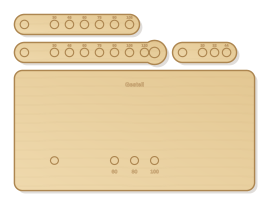
Four-bar linkage of crank, coupler and rocker with many holes: frame length and links can be re-pinned. A pen on the coupler draws the typical coupler curves, from oval to figure eight.
- Size
- 256 × 192 mm, 5 mm thick
- Material
- Plywood
- Difficulty
- Intermediate
- Milling time
- approx. 13 min
- Bits
- V-bit 60°, End mill Ø 3.175 mm
- Customise
- Size, text and details adjustable with sliders
Free with an account · carve with Chrome or Edge · no installation
Build instructions
Materials and accessories
| Qty | Part |
|---|---|
| 1 | Beech dowel rod 8 mm |
| 1 | Wood glue (water-resistant D3) |
Also: sandpaper (grit 120 and 240), a utility knife or fine saw and, for joints, a rubber mallet.
Carving and finishing
- Clamp the workpiece flat on the spoilboard or secure it with double-sided tape, and set the origin as shown in the carving assistant.
- Engrave hole distances, mill all joint holes, then cut out base, crank, coupler and rocker.
- Free the parts at the holding tabs with a utility knife or fine saw and sand the tab remains flush.
- Before gluing, dry-fit everything. If a joint is too tight, increase the clearance by 0.05 mm and carve the part again; if it wobbles, reduce it.
Assembly and final touches
- Glue two short dowels into two holes of the frame row of the base. Put the crank on one and the rocker on the other and connect both with the coupler; all joints loose with dowel and washers.
- Put a pencil through the large hole at the end of the coupler, lay paper underneath and turn the crank. If the crank is the shortest link and the sum of the shortest and longest is less than that of the other two, it turns all the way round (Grashof).
How to carve this template
- OpenOpen the template in the app and adjust size and text if you like.
- CheckLook at it in 3D, check run time and warnings.
- Set upThe carve wizard guides you through material, clamping, bit and zero point.
- CarvePress start; the app drives your Grbl router directly over USB.